
May 19, 2026
Best YouTube Tag Generator Tools in 2026 Free Vs Paid - Compared
If you've ever uploaded a video to YouTube and stared blankly at the "Tags" field — you're in good company. Tags are one of the most misunderstood parts of YouTube SEO. Most creators either skip them entirely or stuff in random words hoping something sticks.
The truth? A good YouTube tag generator saves you hours of research and helps your videos surface in front of the right audience. A bad one wastes your time with irrelevant suggestions that do nothing for your channel.
In this guide, we've tested and compared the best YouTube tag generator tools available in 2026 — free and paid — so you can pick the right one without guesswork.
Do YouTube Tags Still Matter in 2026?
Before comparing tools, let's answer the question you're probably asking first.
Yes — YouTube tags still matter in 2026, but their role has evolved. They're no longer a primary ranking signal. Your title, thumbnail, description, and watch time carry far more weight. However, tags still do three important jobs that are worth your attention.
Watch Time
Primary ranking factor
Click-Through Rate
Title + thumbnail driven
Title & Description
Keyword relevance signal
Tags
Supporting signal — still counts
Here's what tags specifically help with in the current algorithm:
They help YouTube categorise your video — especially for niche or technical topics where the title alone might be ambiguous. They trigger related video suggestions — showing your content alongside similar videos, which is where a significant portion of YouTube traffic actually comes from. They give new channels an early signal boost — when you have no watch history or audience data yet, well-chosen tags help YouTube understand your content from day one.
💡
According to recent research, YouTube's recommendation algorithm now uses large language models to understand content context — not just keyword matching. Tags still act as reinforcement signals that confirm your video's topic. Five relevant, specific tags outperform fifty generic ones every time.
What to Look For in a YouTube Tag Generator
Not all tag generators are created equal. Here's what separates the genuinely useful ones from the noise:
Source of data — the best tools pull from YouTube's own autocomplete, meaning tags are based on what real people are actually searching for right now — not from a static database that was last updated in 2023.
Relevance scoring — tools that rate tags by how closely they match your video topic save you the manual filtering work. Look for tools that show a broad-to-long-tail mix rather than just surfacing the most popular terms.
Zero friction — the best free tools work without connecting your YouTube account, no daily caps, no email walls. If a tool is interrupting your upload workflow, it's costing you more than it's saving.
Tag count guidance — YouTube allows 500 characters total across all tags. A generator that gives you 30–40 relevant suggestions gives you enough to work with while letting you curate down to the best 8–12.
The Best Free YouTube Tag Generators
⭐ Editor's Pick — Free
1. Vidools AI — Best for Complete YouTube Metadata Optimisation
01
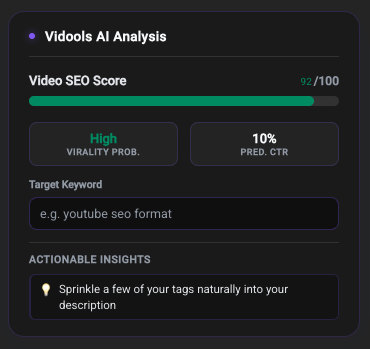
If you want more than just tags, Vidools goes well beyond a basic tag generator. It's an AI-powered Chrome extension that generates SEO-optimised titles, descriptions, and tags for your videos directly inside YouTube Studio — with a single click.
Where most tag tools hand you a list to copy and paste elsewhere, Vidools analyses your video's focus keyword and generates metadata that works together. Your title, description, and tags are all aligned around the same search intent. That coordination is what actually moves the needle on rankings — not any one piece in isolation.
For creators serious about growth, the time saved across every upload compounds fast. No switching tabs, no manual copy-pasting, no guessing whether your metadata is consistent.
Best for: Creators who want to optimise their entire upload workflow, not just tags
✓ Free to startChrome ExtensionWorks inside YouTube StudioNo credit card requiredAI-powered
Free
2. RapidTags — Best for Speed
02
RapidTags is a clean, no-frills web app. Type a keyword, get 30–50 tag suggestions in seconds. No account needed, no installation, works on any browser. It pulls data from YouTube's autocomplete, so suggestions reflect what viewers are actually typing — not what an algorithm thinks they should be typing.
The free tier has a daily search limit, which is worth knowing if you're uploading frequently. For occasional use or as a quick supplement to your primary tool, it's excellent.
Best for: Quick tag generation when you already know your main keywordPrice: Free (with daily limits)
✓ No account needed30–50 tags per searchDaily search limit
Free
3. TunePocket — Best for Real-World Tag Research
03
TunePocket's generator focuses on tags that appear in real, trending YouTube videos rather than algorithmically generated suggestions. That distinction matters — you're seeing what's working for actual videos in your niche, not theoretical keyword ideas from a dataset.
It also includes optional coverage of common misspellings of your main keyword — following YouTube's own recommendation to cover how viewers actually type their searches, typos and all.
Best for: Researching what tags successful videos in your niche are already usingPrice: Free
✓ Real video dataIncludes misspellingsNiche-specific
Free / Paid
4. Keyword Tool (keywordtool.io) — Best Long-Tail Pipeline
04
Keyword Tool uses YouTube's autocomplete to generate hundreds of long-tail keyword variations from a single seed term. On the free plan, results are partially obscured — but you still get enough useful suggestions to build a solid tag list. Where it really shines is in surfacing long-tail variations you would not have thought of on your own.
Best for: Building a long-tail keyword list that doubles as tag researchPrice: Free (limited) · Pro from ~$69/month
✓ Long-tail focusYouTube autocomplete dataPartial results on free plan
Free — Built In
5. YouTube Autocomplete — The Underrated Built-In Tool
05
This one's easy to overlook because it's already there. Open YouTube, start typing your keyword, and pay attention to every autocomplete suggestion. Those are real searches from real users, right now, with no data lag.
The underscore method takes this further: type an underscore followed by a space before your keyword (e.g., "_ YouTube SEO") and YouTube surfaces words that commonly appear before your term in actual searches. It's completely free and surfaces tag ideas most creators miss entirely.
Best for: Zero-cost research that reflects live search behaviourPrice: Free — always
✓ Real-time data✓ Zero frictionUnderscore method
The Best Paid YouTube Tag Tools
Paid
6. TubeBuddy Pro — Best for YouTube Studio Integration
06
TubeBuddy is a Chrome extension that lives inside YouTube Studio. During upload, it shows tag suggestions, keyword scores, and competition data directly in the interface — you never need to leave YouTube to research tags. The free tier offers limited suggestions; the Pro plan (~$9/month) unlocks the full Tag Explorer, keyword research, and competitor tag analysis.
Best for: Channel managers who want in-context SEO data during uploadPrice: Free (limited) · Pro ~$9/month
In-Studio integrationCompetitor tag analysisLimited free tier
Paid
7. vidIQ Boost — Best for Data-Driven Research
07
vidIQ shows search frequency, competition scores, and tag recommendations based on your video title. It's the most data-rich option on this list — if you want to know not just what tags to use but why they're worth using, vidIQ gives you that visibility. The Boost plan ($39/month) unlocks full keyword research tools and competitor tag analysis. That price is steep for casual creators, but for channels treating YouTube as a serious business, the data justifies it.
Best for: Data-focused creators who want search volume and competition scoresPrice: Free (limited) · Boost ~$39/month
Search volume dataCompetition scoresExpensive for casual use
Free vs Paid: Which Should You Choose?
For most creators — especially those just starting or growing to their first 10,000 subscribers — free tools are more than enough. The difference between a free and paid tag list is far smaller than the difference between optimised metadata and no metadata at all.
Your SituationBest ChoiceCostNew channel, just starting outVidools + YouTube Autocomplete✓ FreeUpload 1–2 videos/week, no budgetVidools + RapidTags + TunePocket✓ FreeWant full metadata optimisation in one toolVidools AI✓ FreeWant tag data inside YouTube StudioTubeBuddy Pro$9/monthNeed search volume and competition scoresvidIQ Boost$39/monthAlready doing keyword researchKeyword Tool.ioFree / $69+/month
💬 The key insight: Spending $39/month on vidIQ will not help your channel if your titles, thumbnails, and first 30 seconds aren't already working. Always optimise content quality before optimising tools budget.
Already using YouTube Studio? Vidools works right inside it.
Generate SEO-optimised titles, descriptions, and tags from a single keyword — free, no credit card required.
How to Actually Use Your Tag Generator (Step by Step)
Getting good tag suggestions is only half the work. Here's how to deploy them properly for maximum effect.
1
Start with your primary keyword
Whatever keyword is in your video title goes in as your first tag — exactly as written. This tells YouTube that your title and tags are aligned, which reinforces your topical signal.
2
Generate a broad list
Use Vidools, RapidTags, or your preferred tool to get 30–50 suggestions. Cast wide first; you'll narrow it down in the next step.
3
Filter ruthlessly
Remove anything that doesn't directly describe your video content. Irrelevant tags confuse the algorithm — and can hurt engagement when the wrong viewers find your video and click away.
4
Mix broad and specific
Include 2–3 broad tags ("YouTube SEO," "YouTube tips") alongside 5–8 specific long-tail phrases ("how to rank YouTube videos for beginners 2026"). The broad tags catch wide searches; the long-tails catch high-intent ones.
5
Add your brand tags last
Your channel name and any consistent series names go at the end of your tag list. They help YouTube associate your videos with each other and build channel-level topical authority over time.
6
Stay under 500 characters
YouTube's total tag limit is 500 characters across all tags combined — not per tag. A focused list of 8–12 tags hits the sweet spot between coverage and relevance. Quality, not quantity.
Common Tag Mistakes to Avoid
🚫
Copying competitor tags wholesale
Researching what successful videos use is smart strategy. Copying their entire tag list verbatim is not — YouTube flags it as manipulative and it signals your content is derivative rather than original.
🚫
Using only popular one-word tags
"Photography," "cooking," "gaming" — these are dominated by massive channels with years of authority. Long-tail tags like "street photography tips for beginners with iPhone" are where new and growing channels can actually rank.
🚫
Ignoring tags entirely
Some creators skip tags because "they don't matter anymore." Tags matter less than they used to — but they still help, especially for niche topics and in the crucial early hours after upload when YouTube is figuring out who to show your video to.
🚫
Treating all tags equally
Put your most important tag first. YouTube pays more attention to the beginning of your tag list. Your primary keyword — the one in your title — should always be tag number one.
🚫
Optimising tags in isolation
Tags work best when they match your title, description, and spoken content. An AI-powered tool like Vidools handles this automatically — your entire metadata layer points at the same search intent.
Final Verdict
For 2026, the best approach is to combine tools rather than rely on just one. Here's the stack we recommend:
Use Vidools AI for complete metadata optimisation — titles, descriptions, and tags working together in one workflow.
Use RapidTags or TunePocket for a quick supplementary tag list when you want a second data source.
Use YouTube Autocomplete to validate that real viewers are actively searching your target phrases right now.
Consider TubeBuddy Pro if you want in-Studio integration and are uploading regularly with a budget to invest.
Tags alone won't make or break your channel. But well-researched tags, combined with a strong title and description, send YouTube a clear, consistent signal about your content — and that consistency compounds over time. The creators growing fastest in 2026 are the ones who spend time on metadata before hitting publish.